By Casey Smith, Payabli Docs
Key takeaways
- Payabli Integration Skills are open-source agent skills that point your AI coding agent at the live Payabli docs, so it ships a working integration from one prompt: payments in and out, invoices, payment links, webhooks, disputes, and reporting. A thirty-minute session, full integration, no manual fixes, validated against a live sandbox.
- Without that grounding, agents guess. They invent endpoints and skip steps that have to happen in order, so the code compiles and then breaks. Skills hand the agent the real endpoints and the right sequence up front.
- Skills run in any agent that supports the open Agent Skills standard: Claude Code, Cursor, Codex, GitHub Copilot, and Gemini CLI. They cover the whole surface, from payments to webhooks to certification.
- The order of operations and gotchas are written into each skill by hand, while facts like endpoints link out to the live docs, so the skills stay current as the API changes, with no skill to re-ship.
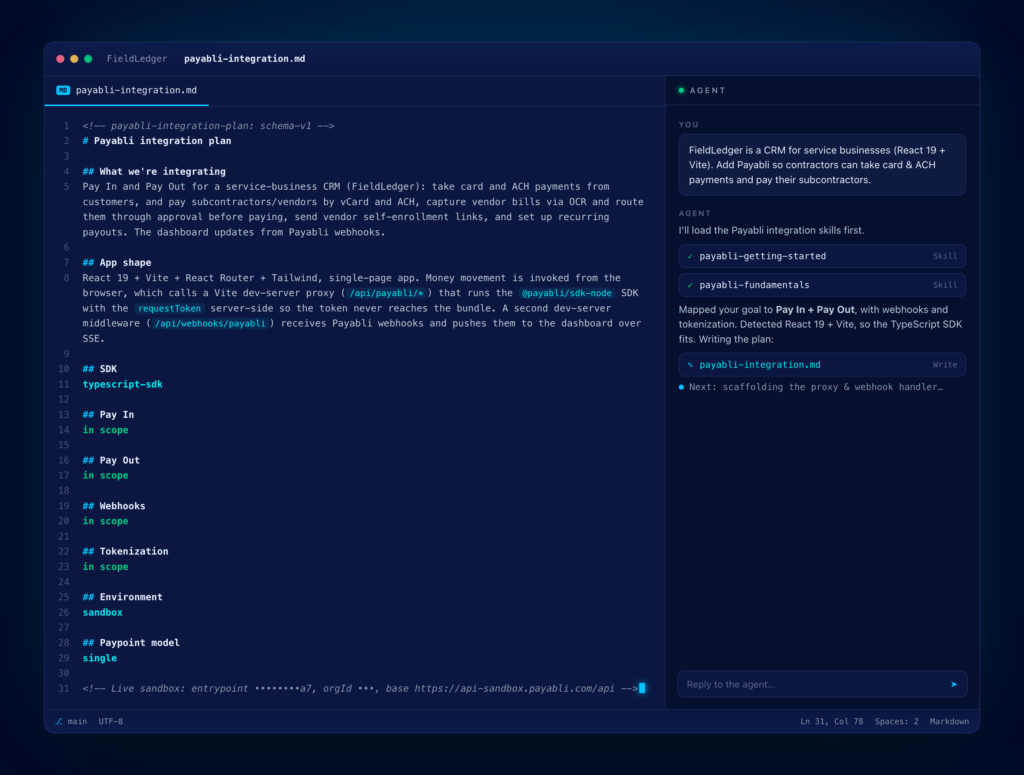
During a thirty-minute session, I built an integration with Payabli that wired up CRUD operations for vendors and customers, payment acceptance, payout functionality, invoices, payment links, chargeback response handling, and reporting dashboards, all of it from a single prompt, with no manual fixes, validated against a live sandbox. I’m not bragging. I did it all with Claude Code and Payabli’s new Integration Agent Skills, a set of open-source agent skills, grounded in the Payabli docs, that give your coding agent the procedural knowledge and ground truth it needs to build a sound Payabli integration from the first prompt.
Why ungrounded AI agents write code that fails
If you’ve spent any time building with an AI coding assistant, you’ve probably seen this: the agent produces code that looks completely right. It uses endpoint patterns that are extrapolated from an API surface, parameter names that follow reasonable conventions, and webhook event types that feel like they should exist. And then none of it works.
This isn’t a failure of the model or the agent, it’s a grounding problem. Grounding is the practice of connecting an AI agent to accurate, current information so it works from facts rather than inference. A coding agent that hasn’t been given accurate, up-to-date information about a specific API will fill in the gaps with plausible-looking guesses (even if you tell it not to make mistakes). Ask it to fetch a user’s orders, and it’ll guess GET/users/{id}/orders clean, RESTful, exactly the route you’d guess yourself. But the real API might nest that resource differently, or expose it somewhere else entirely. The guess is reasonable, conventional, and wrong. But there’s no way to know that from the outside; you have to read the docs.
Hallucinated endpoints are one visible version of bad grounding. Less obvious problems with bad grounding are procedural gotchas: things like steps that have to happen in a specific order or status transitions that aren’t obvious from the API shape alone. For example, a bill that’s been sent for approval sits in a pending state that blocks payout until it’s resolved, so an agent that tries to pay it right away gets a failure that it couldn’t predict and then has to debug. The agent would only know to avoid this if it read the docs.
This is the gap that skills help you close.
How Payabli Integration Skills work
A skill is a structured instruction document that your coding agent loads into context when it’s relevant. It tells your agent how to approach a specific kind of task, not just what the API looks like, but what to do first, what decisions to make along the way, and what patterns to follow. Think of it as giving your agent a knowledgeable colleague who has already read the docs, knows the gotchas, and will speak up before you make a mistake.
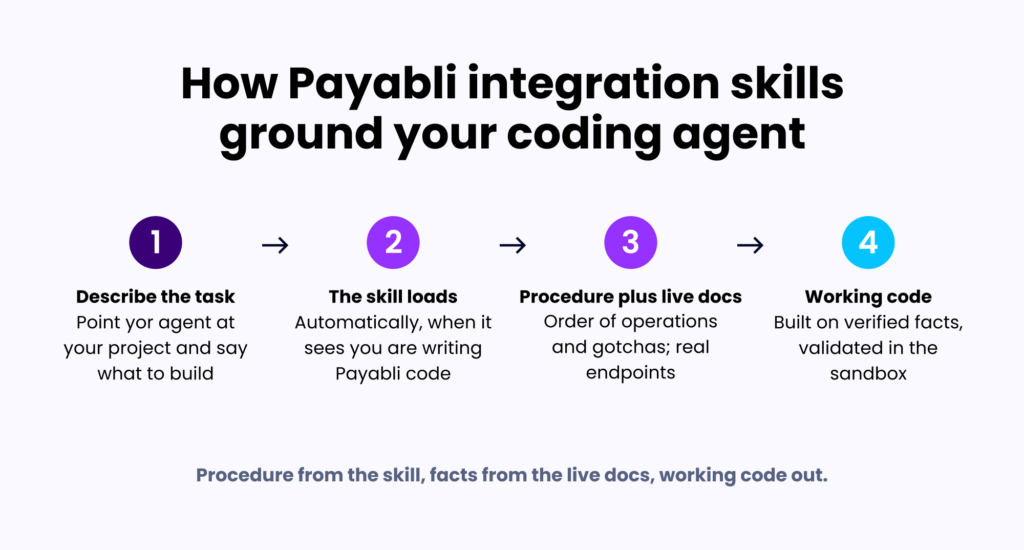
We authored our skills using the Agent Skills standards, which define how skills are structured and discovered. You don’t have to invoke the skills by name, your agent loads them on its own when it recognizes you’re writing Payabli code. Just describe what you’re building.
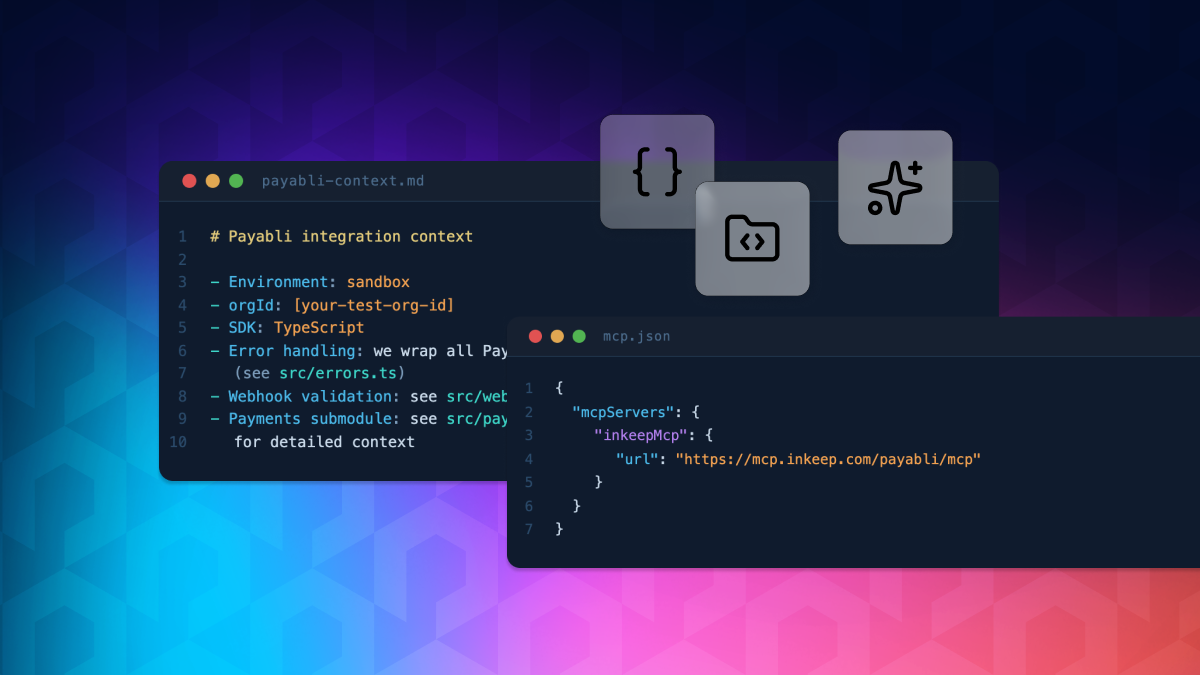
Most integrations start with payabli-getting-started, which interviews you rather than dumping a wall of context at your agent. Point your agent at your project and say something like: “I want to add Payabli payments to this app, look at my stack and tell me which Payabli pieces I need and how to wire them up.” The skill walks your agent through a structured conversation about your goals, your app architecture, and which Payabli features you need. Out of that conversation comes a payabli-integration.md artifact, a plain-markdown file that lives in your repo and records the plan. As you work, your agent updates it. From that point on, the right skills load automatically as you build. Your agent has the auth patterns, the order of operations, and the gotchas it needs for whatever you’re working on next, and pulls exact endpoint paths and field names from the live docs, so the code it writes is based on verified information.
That artifact is what makes multi-session work tractable. Come back the next day in a fresh session, and your agent can read the file, pick up where you left off, and know what you’ve already built and what’s coming next. The other Payabli skills read from it, so decisions you made early in the integration follow through consistently.
Skills cover the full integration surface: payments in, payments out, subscriptions, webhooks, disputes, reporting, and certification prep. They work in any agent that supports the standard, including Claude Code, Cursor, Codex, GitHub Copilot, Gemini CLI, and more. How we built Payabli Integration Skills
Keeping skills accurate at scale requires an intentional architecture. Our approach was shaped by two ideas.
Skills stay lean by design
Every skill was written against the Agent Skills spec and validated with the skill-validator tool. The whole set passed, and every skill sits comfortably within the size limits the spec recommends as a best practice. This matters because context is finite: every token a bloated skill takes up is a token your agent can’t spend on your actual code.
Procedural knowledge is human-curated, factual content links out
Each skill contains two kinds of content. The procedural knowledge, like the order of operations, the decisions that matter, and the gotchas, is written in the skill and stays in the skill. The factual content, like endpoint paths, field names, and response shapes, doesn’t get copied into the skill, and instead links out to the live docs at docs.payabli.com.
That distinction is what helps keep our skills current. When we ship a release, we update the docs. A skill that links to a docs page is reading from the current version the next time your agent fetches it, so there’s no skill update required. The procedural content is the part that changes less frequently and benefits most from close human review when it does change.
That human involvement is intentional. The procedural knowledge in each skill, the sequencing, the gotchas, and the decision guidelines, is written and maintained by the Payabli Docs team, not auto-generated and shipped. Every skill has been tested against real sandbox integrations to verify that it guides agents into correct, working code that follows best practices. We’re building tools to help you integrate faster with AI, but we’re not outsourcing the judgment about what good integration advice looks like. That part stays with people.
Skills give your agent an accurate foundation: the right patterns, the right sequence, the real endpoints. Think of them as guardrails, not autopilot. They don’t control what your agent does with that foundation, so the output is still worth your review before it goes anywhere near production.
Integration Skills and the Docs MCP: Use both
Skills and the Payabli Docs MCP server are complementary. Here is how they divide work:
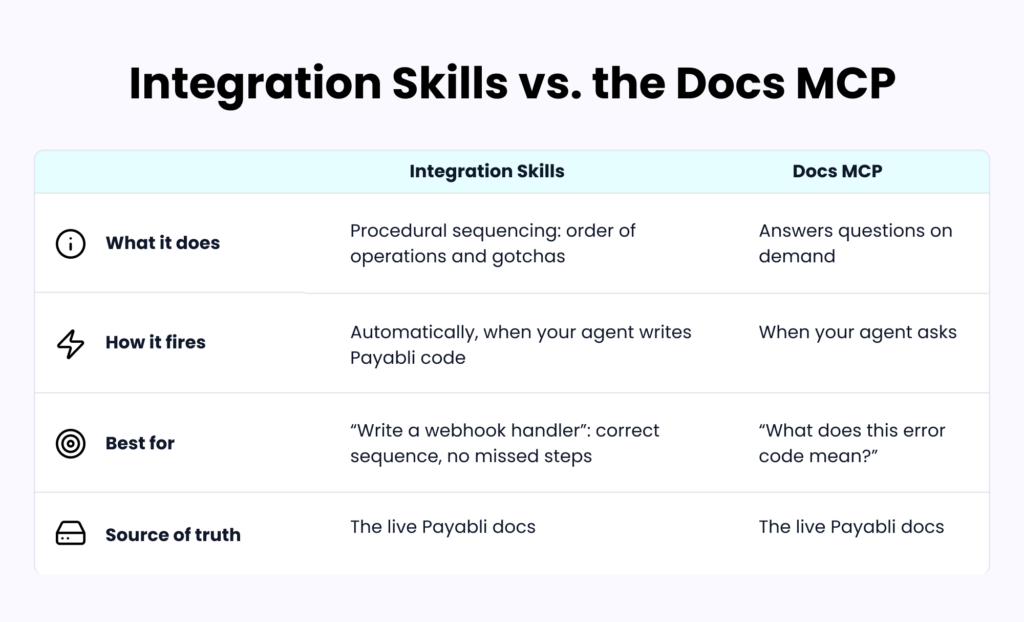
The MCP answers questions: “What does this error code mean?” or “How does paypoint scoping work?” It’s conversational: your agent asks, the MCP reads the docs, and responds.
Skills handle procedural sequencing: when your agent is about to write a webhook handler, the relevant skill fires and gives it the order of operations and the gotchas to watch for, without you having to tell it what to do.
Both read from the same source of truth, so they converge on the same answers. The skill set even includes payabli-mcp-setup which configures the Docs MCP for you, so it’s easy to install both.
Who Payabli Integration Skills are for
Payabli Integration Skills are useful for two kinds of builders.
If you’re building with a coding agent and limited fintech experience, skills are the difference between an agent that ships and an agent that confidently produces code that doesn’t work. Skills give your agent the right Payabli knowledge to integrate safely. In my run, it didn’t need course-correcting, which matters most when you don’t know the platform well enough to course-correct it yourself.
If you’re an experienced developer using AI tooling to move faster, skills save you from looking up details every time you touch a new part of the Payabli surface. The void vs. refund decision, the bill status transitions, the CIT/MIT distinction, they’re there when you need them, and out of the way when you don’t.
Get started with Payabli Integration Skills
Install the skills and start building. The README walks through the install options for each supported agent, so you can pick the one that fits how you work. Point your agent at your project, describe what you want to build, and let the skills handle the grounding.
payabli/integration-skills on GitHub →
Learn about our developer toolsand agent resourcesin the Payabli Docs.